One of the most misunderstood technologies on the internet is the Domain Name System or DNS. It could be considered the red headed stepchild, sorry to all my red heads out there, but without it getting around the internet would not be fun. Think of having to memorize latitude and longitude coordinates to get to a location vs just typing in find me food into your GPS or in your favorite maps app. DNS comes in different types, like where your email servers are located or the ability to put text strings for domain verification. We are going to look at what is known as the host record, A.K.A the A Record. Lets learn how DNS works
Heres a video!
If you are like me and learn while reading and potentially watching a video,
Beyond the URL: Let’s Unpack Your Internet’s Secret Road Trip!
OK, we are sitting at our computer and we want to go to the best website on the internet, https://mikelossmann.me. What actually happens? Well, for starters, computers do not talk in fully qualified domain names or FQDN’s, they talk to each other in IP addresses. No, not the ones you see on movies or TV shows, as a network engineer, they make me cringe. This is where DNS comes in. It takes the easy to remember FQDN’s and tells the computer what IP address that website is on.
My House, My Rules: When Your Computer Decides Who’s Who (Thanks, Hosts File!)

Yes, you read that right, but it is not the smartest thing to do. It sometimes is a necessary evil, for example, you have two servers that talk to each other but some developer hardcoded that it has to use a domain name vs the statically assigned address. This is where you can use a local DNS entry. These are typically found in a hosts file. The host files can be found here:
- Mac and Linux:
/etc/hosts - Windows:
C:\Windows\System32\drivers\etc
If there is no record for mikelossmann.me there the computer will send out a standard DNS Query to a local resolver
DNS Local Resolver – The Cache Whisperer: My Life with Previously Visited Websites

Depending on the equipment you run at home, you might have a local resolver installed. I run Unify gear at home and I have a local resolver here. The local resolver will look at its DNS cache and if there is a match, send a query response back to the host. If there is no match in the DNS cache, it will forward the DNS request out to the recursive resolver.
DNS Recursive Resolver – Your Internet’s Nosy Neighbor (in the Best Way Possible)

This is the first stop a DNS request takes outside of your home network. This is typically your ISP’s DNS servers or manually set servers like Google’s 8.8.8.8 or Cloudflare’s 1.1.1.1. It behaves the same way that your local resolver does. If there is a match in the cache it will respond back but if there isn’t, then it will send a request to the grandfather of the DNS world, the root name servers
My Countdown Clock: Why Your Internet Doesn’t Stay Fresh Forever
There has been a lot of talk around DNS cache. This is just a fancy way of saying how long a server can hold onto a DNS record for before it deletes it. THis is done to ensure that servers always have the most up to date information. This cache is set to 5 minutes by default and can be longer or shorter, depending on how the administrator of that domain wants it.
Root DNS Server – The 13 Elders: Tales from the Top of the DNS Tree

The root DNS server’s job is to take a DNS request from the recursive resolver and tell him what top level domain (TLD) DNS server to go to for that domain. The root server will respond back with the appropriate TLD name servers
TLD DNS Server – Yes, I Know Who Owns That Domain. No, I Won’t Tell You Their Password.

First what is a Top Level Domain, or TLD. This is what is at the end of the FQDN, so .com, .net, .org are all top level domains. In this case the top level domain for my site is .me. The Top Level Domain Server will tell the recursive resolver who is the authoritative server for my domain. The TLD name server will respond back to the recursive resolver with the authoritative name server
Authoritative DNS Server – I Know Your IP. (And All Your Subdomains Too.)
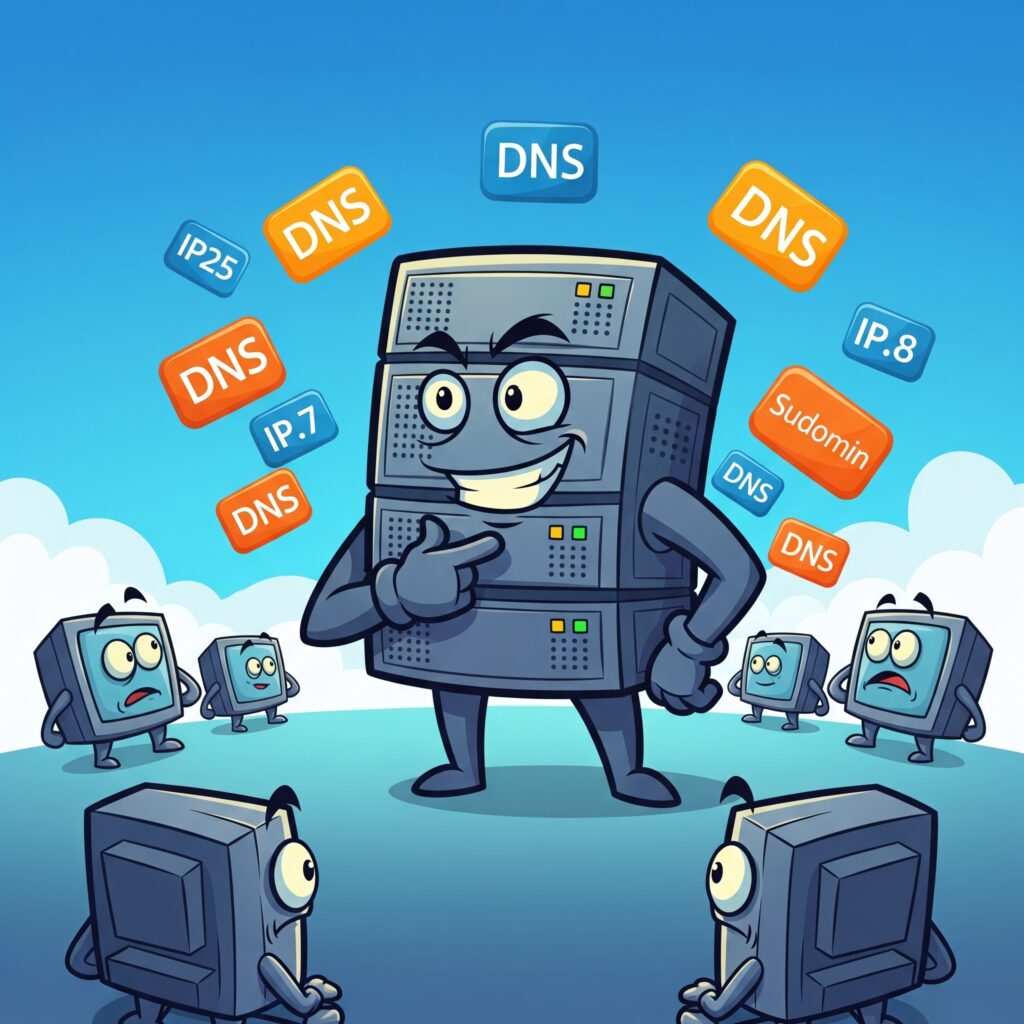
This is where the magic happens. The DNS request from the recursive resolver finally comes to the authoritative DNS server. What this server does is finds the IP address that belongs to the FQDN. It will respond back to the recursive resolver with two pieces of information.
- The IP Address of the resource
- The time to live or TTL
From here the authoritative DNS server will send a standard response back to the recursive resolver. The recursive resolver will send a standard response back to the local resolver. Finally the local resolver will send a standard response back to the host saying that mikelossmann.me is at 40.12.49.12
Wanna see a magic trick?
If you are like me and curious. This is what a standard response and standard request looks like in Wireshark. We can see the standard request and the standard response and the contents of the packets.
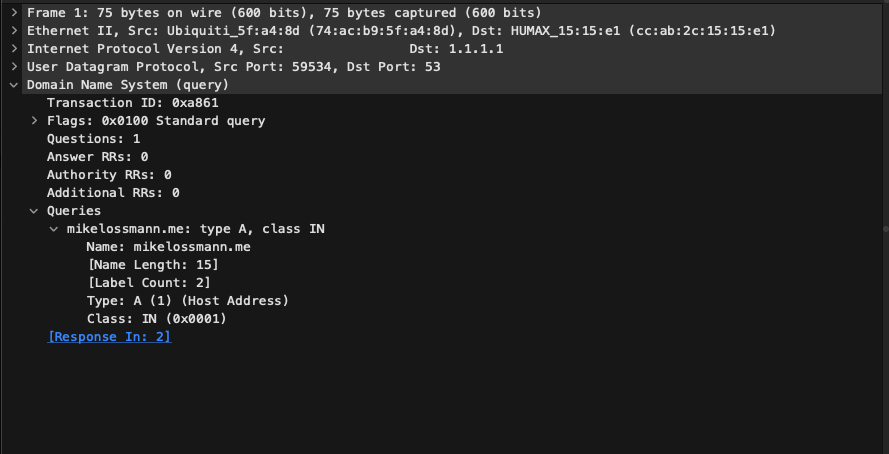
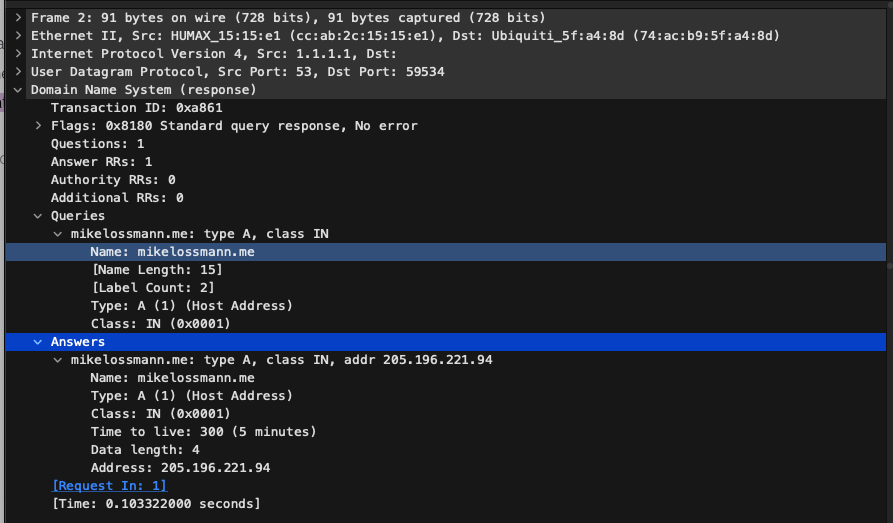
There you have it! This is what DNS is in a nutshell. We introduced to some of the players who participate in the functionality of DNS. The next time there is an issue on the internet, let’s not jump to conclusions. Let this unsung internet hero go for a few minutes without being blamed. What was the worst outage that you had to deal with that you thought was DNS but turned out not to be. Let me know in the comments below or over on my socials. Catch you on the next one!