A Network Architect’s Guide to Keeping Your Link-State Zoo Organized
Welcome to Post 3, where we talk about something near and dear to every OSPF architect’s heart:
Keeping the network from becoming a flaming LSDB dumpster fire.
image a meme where OSPF enters the chat
Enter OSPF Areas—the protocol’s built-in organizational system.
Think of areas as OSPF’s way of saying:
“Look, we can’t have everyone knowing everything all the time. That’s how the network melt-downs happen when something goes wrong”
So we compartmentalize.
We segment.
We place routers in little logical buckets so they behave themselves.
Let’s dive in.
Why Do OSPF Areas Exist?
Because scaling OSPF without areas is like trying to run a 500 person book club where everyone must read every book, every week, and every few seconds.
Without areas:
• The LSDB grows until your routers cry
• SPF calculations run way too often
• Every flap triggers a network-wide drama
• Convergence gets slower
• CPU usage spikes
• Your phone rings at ungodly hours
Areas don’t just reduce database size — they contain LSA flooding scope. A topology change in Area 2 should not trigger SPF recalculation in Area 5. That containment is what actually protects your core.
Areas are OSPF’s way of saying: “Let’s break the network into smaller, less excitable pieces.”
⸻
The One Area That Rules Them All: Area 0 (Backbone)
Area 0, also known as the backbone, is OSPF’s HQ.
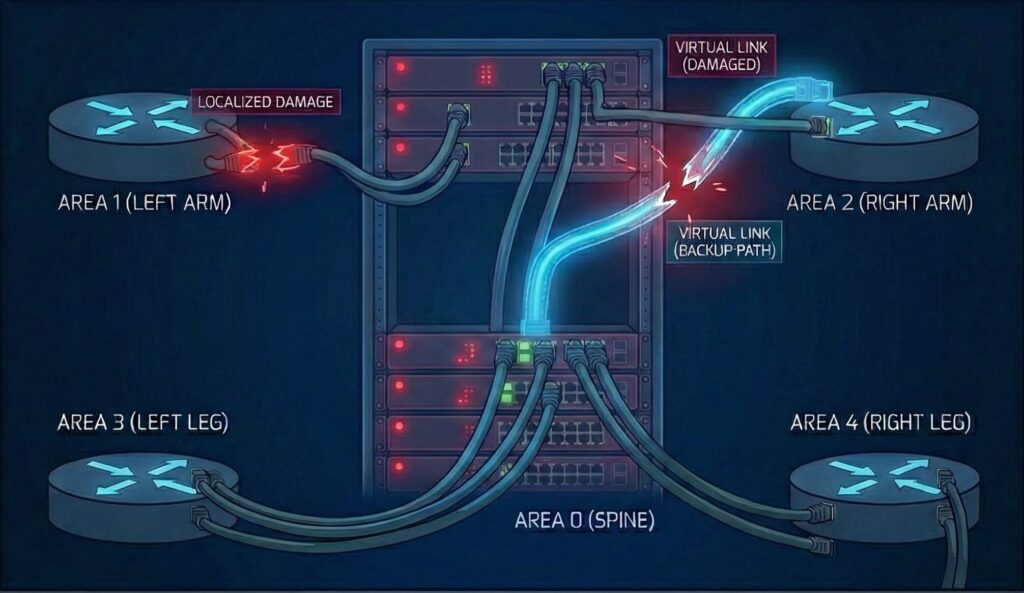
Every other area must connect to it—directly or through a virtual link (yes, we’re going there).
Why Area 0 matters:
• It’s where all inter-area traffic flows
• It provides topological consistency
• ABRs use it to summarize routes
• Without it, your OSPF domain is basically a collection of awkward silos, like your IT departments
Trying run OSPF without Area 0 is how you create isolated routing kingdoms that technically function… until they don’t.
The OSPF Cast of Characters for Area Design
Internal Router
Lives entirely inside one area.
Simple. Blissfully unaware of the wider chaos.
ABR (Area Border Router)
Has interfaces in Area 0 and at least one other area.
It’s the diplomat, the translator, the HR department of your OSPF design.
ASBR (Autonomous System Boundary Router)
Imports external routes into OSPF.
The protocol equivalent of smuggling information across borders.
Backbone Router
Any router sitting in Area 0.
Qualifications vary wildly—from tiny switches to giant cores.
⸻
OSPF Area Types: Because Variety Is the Spice of Routing
Let’s break down the areas you will run into and the ones you should run from.
⸻
1. Standard Areas
These are the normal, healthy, well-adjusted areas.
• Accept all LSAs
• Perfect for general use
• No special rules
• No surprises (usually)
If OSPF were a family, standard areas are the siblings who move out early and get normal jobs.
⸻
2. Stub Areas
Stub areas keep things simple.
They refuse external LSAs (Type 5) and instead receive a default route from their ABR.
Good for:
• Branch sites
• Places with limited CPU
• Areas you don’t trust with complicated information
Stub areas say: “I don’t need to know all the AS external drama—just tell me where the internet is.”
3. Totally Stubby Areas
Everything a stub area does… but more dramatic.
• Block Type 5 (external)
• Block Type 3 (inter-area)
• ABR injects a default route
This area is basically OSPF on Do Not Disturb mode. Great for single-path, dead-end branches.
4. NSSA (Not-So-Stubby Area)
This one’s spicy.
NSSAs allow Type 7 LSAs (external routes), but still block Type 5s.
It answers the age-old question: “Can my area be mostly a stub, but also import some random BGP routes?”
Yes. Yes, it can. ABRs convert Type 7 → Type 5 when sending the info to the backbone.
5. Totally NSSA
A quieter, more introverted version of NSSA.
• Blocks Type 3
• Blocks Type 5
• Allows Type 7 (local external routes)
• Injects a default route
This area is like a hermit who will ONLY import external information if it’s local.
Virtual Links: OSPF’s Awkward Family Reunion
A virtual link connects a non-backbone area to the backbone through another area. It’s basically OSPF tunneling its feelings through a more stable neighbor.
Use cases:
• Temporary migrations
• Bad designs you inherited
• When you realize your backbone is accidentally discontinuous at 2 AM
Important truth: Virtual links are a sign something in your OSPF design needs therapy. With this some inherent design risks come into play, like:
- They extend Area 0 across another area
- They rely on stable transit
- They complicate troubleshooting
- They can break during area partition events
They also extend the backbone across transit areas, which means instability there now becomes backbone instability.
Architect’s Corner: Real-World Area Design Advice
• Keep the backbone stable.If Area 0 sneezes, everyone catches a cold.
• Limit the number of areas per ABR.
2–3 is healthy. 4 is questionable. 8 is how you create an outage.
• Summarize routes at ABRs.
Your SPF timers will thank you.
• Avoid NSSAs unless you truly need them.
They’re useful, but they can get messy fast.
• Never build a hub-and-spoke design with a non-backbone hub.
OSPF will judge you. And so will I.
• Virtual links are a last resort, not a strategy.
Coming Next: “LSAs Explained – The OSPF Postal Service”
In Post 4, we’ll cover the colorful world of LSAs:
• Type 1–7
• Who generates what
• Why some LSAs behave like responsible adults while others behave like arsonists
• And how the LSDB becomes the single source of truth for SPF