If there’s one thing that trips up engineers new to BGP, it’s the difference between eBGP and iBGP. Not because the concept is hard, but because the implications are sneaky. The sessions look the same. The commands are almost identical. But the behavior is different enough to absolutely destroy a network if you’re not paying attention.
Let’s get it straight.
The One-Sentence Version
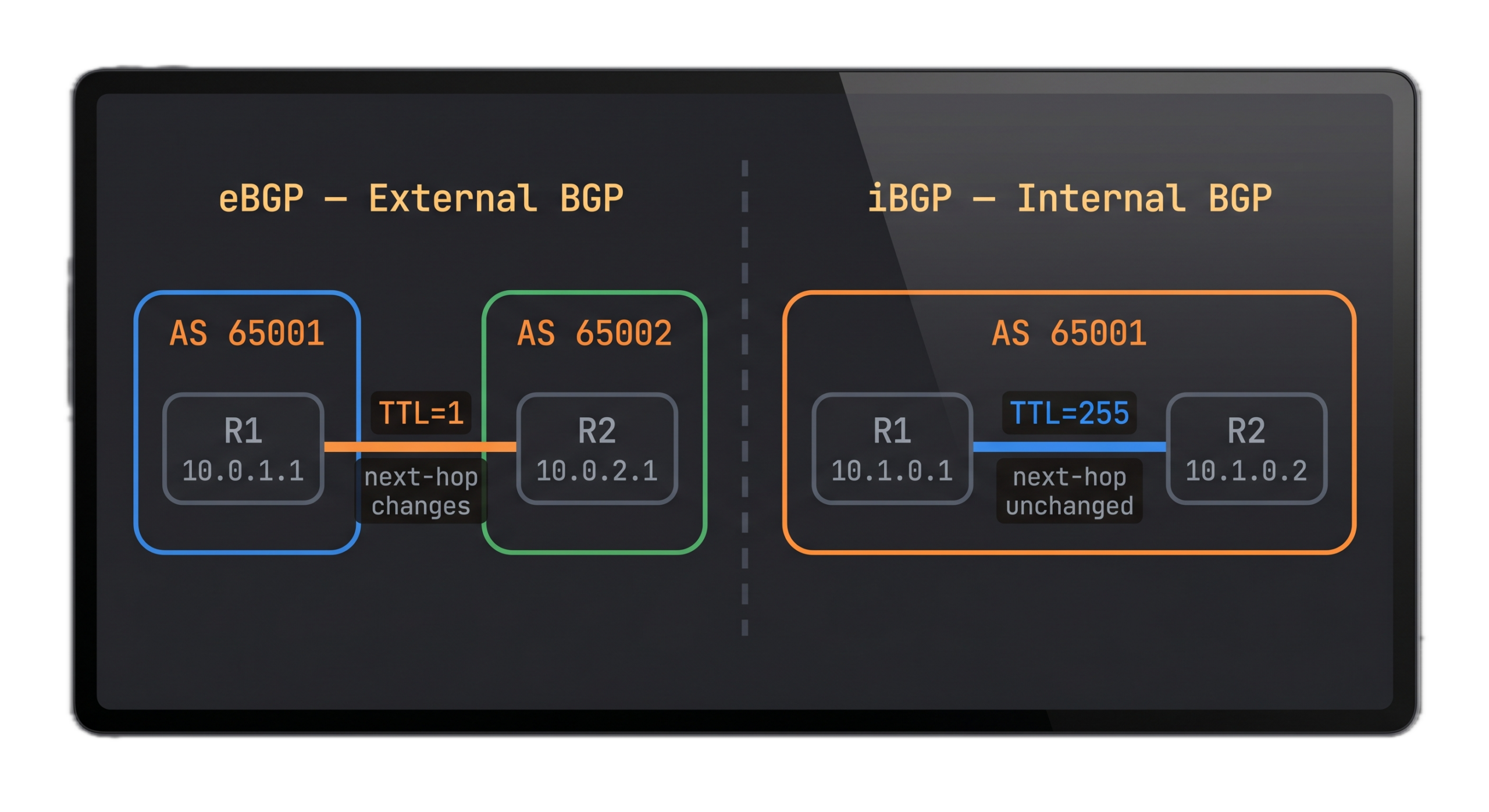
eBGP is BGP between routers in different autonomous systems. iBGP is BGP between routers in the same autonomous system.
That’s it conceptually. The rest of this post is about why that single difference has a cascade of consequences you need to understand before you touch a production router.
eBGP: External BGP
When your edge router peers with your ISP’s router, that’s eBGP. When two different companies exchange routes at an internet exchange point, that’s eBGP. Any time BGP crosses an AS boundary, it’s eBGP.
TTL behavior
By default, eBGP peers are expected to be directly connected. The TTL on eBGP packets is set to 1, meaning the packet can only survive one hop. If your eBGP peer is not directly adjacent, the session won’t come up. You’ll fix this with the ebgp-multihop command, which raises the TTL to allow peering across multiple hops.
Next-hop behavior
When an eBGP router advertises a route to its eBGP peer, the next-hop attribute is set to the advertising router’s own IP address. This is intuitive and it works the way you’d expect.
Administrative distance
On Cisco IOS, eBGP routes have an administrative distance of 20. That means eBGP-learned routes are preferred over OSPF (110) and EIGRP (90) internal routes but less preferred than connected routes (0) and static routes (1).
AS_PATH
Every time a route crosses an AS boundary via eBGP, the traversed AS number gets prepended to the AS_PATH attribute. This is how BGP prevents routing loops. If a router sees its own AS number in the AS_PATH of an incoming update, it rejects the route.
iBGP: Internal BGP
iBGP runs between routers inside the same AS. The most common use case is distributing externally-learned BGP routes across your internal network so every router in your AS knows how to reach external destinations.
TTL behavior
Because iBGP peers are in the same AS, they don’t have to be directly connected. The TTL on iBGP packets is 255. You can peer across multiple IGP hops with no special configuration. In fact, iBGP peers are typically configured using loopback addresses specifically so the session survives a link failure as long as any path exists between the two routers.
Administrative distance
iBGP routes on Cisco IOS have an administrative distance of 200. That’s higher than almost everything else, including OSPF external routes (110) and EIGRP external routes (170). If you’re redistributing IGP routes into BGP and also running an IGP internally, iBGP won’t win an AD tie against the IGP for the same prefix unless you manage this carefully.
AS_PATH modification
Unlike eBGP, iBGP does not append the local AS number to the AS_PATH when advertising to iBGP peers. The AS_PATH stays exactly as received. This is part of how BGP maintains a consistent view of the path across an entire AS.
Here’s where it gets important. When a route is learned via eBGP and then advertised to iBGP peers, the next-hop is not changed. It stays set to the external neighbor’s IP address. Your internal routers receive this route with a next-hop that points somewhere outside the AS. If your internal routers don’t have a route to that external IP, the BGP route is there in the table but it’s not reachable. It won’t be used.
This is why next-hop-self exists. When you configure neighbor x.x.x.x next-hop-self on your edge router, it rewrites the next-hop for iBGP updates to point to itself instead of the external peer. Now your internal routers have a reachable next-hop and everything works.
The Split Horizon Rule
This is the one that catches people.
In iBGP, a route learned from an iBGP peer cannot be re-advertised to another iBGP peer. This rule exists to prevent routing loops within an AS. But it has a serious consequence: for every router in your AS to receive all BGP routes, every iBGP router needs to peer with every other iBGP router. That’s a full mesh.
For a small network with 3 or 4 BGP-speaking routers, full mesh is fine. If you have a network with 10, you need 45 sessions, and for 20 routers, you need 190 sessions. The math is n(n-1)/2 and it scales terribly.
This is why route reflectors and confederations exist. We’ll cover both in detail in upcoming episodes. For now, just understand that the full mesh requirement is a direct consequence of the iBGP split horizon rule, and it’s one of the first scaling walls you’ll hit.
Side-by-Side Comparison
| Attribute | eBGP | iBGP |
|---|---|---|
| Between | Different ASes | Same AS |
| Default TTL | 1 | 255 |
| Next-hop behavior | Set to self | Unchanged |
| AS_PATH on advertise | AS prepended | AS unchanged |
| Admin distance (Cisco) | 20 | 200 |
| Loop prevention | AS_PATH | Split horizon |
| Multihop needed? | Yes, if not adjacent | No |
| Requires full mesh? | No | Yes (or RR/Confederation) |
The Gotcha You’ll Hit Eventually
Even experienced engineers mess this up occasionally. You build an iBGP topology, sessions come up, you can see routes in show bgp, and then you notice reachability is broken. Traffic isn’t actually flowing.
Nine times out of ten, it’s one of two things. Either the next-hop for the iBGP-learned routes isn’t reachable (you forgot next-hop-self or your IGP isn’t advertising the right prefixes), or your full mesh isn’t actually a full mesh and some router is not getting all the routes due to split horizon.
When iBGP isn’t working right, start with show bgp neighbors to confirm sessions are established, then show bgp ipv4 unicast to see what routes are in the table, then check the next-hop reachability with a quick show ip route x.x.x.x on the next-hop address.
If sessions are up and routes are present but traffic is still broken, the culprit is almost always next-hop reachability. Get that fixed first.