BGP path selection is the thing people memorize for certification exams and then forget the moment the cert is in hand. Don’t do that. BGP best path is the algorithm that actually decides which route your traffic takes. If you don’t understand it, you can’t troubleshoot it. And when something breaks at 2am, you’ll be staring at a BGP table with no idea why it picked the path it picked.
This is the reference post. Bookmark it.
The Setup
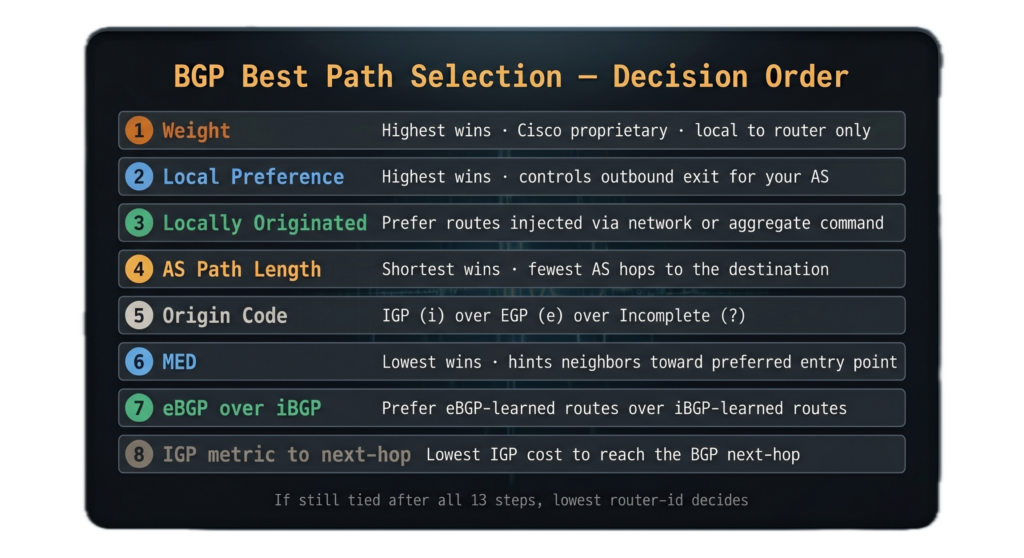
BGP might receive multiple paths to the same destination prefix from multiple peers. It can only use one. The best path algorithm runs through a series of comparisons, in order, and the first one that produces a clear winner stops the process.
Every attribute in this list matters and every one exists for a reason. Let’s go through them.
Step 1: Weight (Cisco-Specific)
Weight is Cisco-originated and behavior varies across vendors — Juniper uses a different attribute (local-preference handles some of this role in Junos), and you should verify platform-specific behavior before relying on weight in a multi-vendor environment.”
Higher weight wins. Weight is local to the router. It is never advertised to any BGP peer. Default weight is 0 for routes learned from peers. Routes originated by the local router have a default weight of 32768.
Use weight when you want to influence path selection on a single router without affecting anything else in the network.
Step 2: Local Preference
Local preference is the first attribute that’s actually part of the BGP standard. Unlike weight, local preference is shared with all iBGP peers inside your AS. It is not sent to eBGP peers.
Higher local preference wins. Default is 100 on Cisco.
Local preference is your primary tool for influencing outbound traffic from your AS. Set it higher on the path you want to prefer and all your iBGP routers will agree on which exit to use.
Step 3: Locally Originated Routes
Routes that originate from the local router are preferred over routes learned from a neighbor. This covers routes added via the
network command, routes redistributed into BGP, and routes generated via aggregation on the local router.
Step 4: AS Path Length
Shorter AS path wins. This is the most well-known BGP attribute and the most commonly misused.
A route with an AS_PATH of “65001 65002” is preferred over a route with an AS_PATH of “65001 65002 65003” because shorter paths are assumed to indicate fewer network hops. Note that “assumed” is doing a lot of work in that sentence. AS path length has nothing to do with actual latency, bandwidth, or quality. It’s just a count of AS numbers.
This is why AS path prepending exists as a traffic engineering technique. You can artificially inflate your AS path to make a route look less preferred without any actual change to the underlying network path.
Step 5: Origin Code
Origin indicates how the route was introduced into BGP.
- IGP (i): The route was injected via the
networkcommand. - EGP (e): The route came from the old EGP protocol. You will basically never see this.
- Incomplete (?): The route was redistributed into BGP from another source.
IGP origin is preferred over EGP. EGP is preferred over Incomplete.
In practice, origin is a tiebreaker you rarely need to think about unless you’re seeing unexpected behavior when mixing network statements and redistribution..
Step 6: MED (Multi-Exit Discriminator)
Lower MED wins. MED is used to influence which entry point into your AS a neighboring AS should use when multiple connections exist between the two.
Here’s where it gets complicated. By default, Cisco only compares MED values between routes from the same neighboring AS. If you receive routes to the same prefix from two different ASes, their MED values are not compared with each other. They’re treated as if MED doesn’t exist for that comparison.
You can change this with bgp always-compare-med but this can cause routing loops in some topologies, so understand what you’re doing before enabling it.
MED is also the attribute that vendors have the most divergent behavior around. IOS-XR, Junos, and Arista EOS all handle MED comparison subtly differently. If you’re operating a multi-vendor environment and MED is part of your traffic engineering strategy, test the behavior explicitly on every platform before relying on it in production.
Step 7: eBGP Over iBGP
Routes learned via eBGP are preferred over routes learned via iBGP. This makes sense. If you learned a route directly from an external peer versus from an internal router that learned it from an external peer, the more direct information wins.
Step 8: IGP Metric to Next-Hop
Among routes that have survived to this point, the one with the lowest IGP metric to reach the BGP next-hop wins.
This is where your internal routing protocol starts influencing BGP path selection. If two OSPF paths have equal cost to the same BGP next-hop, BGP may load-balance, if configured with maximum-paths. If one path is clearly shorter in the IGP, BGP prefers it.
Step 9: Oldest eBGP Route
If everything so far is tied, the route that has been in the BGP table longest wins. This provides stability: once a path is selected it stays selected as long as it remains valid, even if a new equally-good path appears.
This attribute only applies to eBGP routes.
Steps 10-13: Tiebreakers
If you’re still tied after everything above, BGP works through a series of final tiebreakers.
Lowest router ID. The router with the lowest BGP router-id wins. The router-id is typically the highest IP address on a loopback interface, or the highest IP address on any active interface if no loopback exists. Unless manually configured, which is preferred
Lowest cluster list length. In route reflector environments, routes that have passed through fewer route reflectors are preferred.
Lowest neighbor IP address. The peer with the lowest IP address wins. This is the last resort tiebreaker.
The Mnemonic
There are several mnemonics floating around for BGP path selection order. Pick one that works for you and stick with it. A common one is:
We Love Oranges As Oranges Mean Pure Refreshment
Which maps to: Weight, Local Preference, Originated Locally, AS Path, Origin Code, MED, Preferences (eBGP over iBGP), and Router ID.
That doesn’t cover the later tiebreakers but it covers the ones you’ll use 95% of the time.
How to Use This in Troubleshooting
When a route isn’t being selected the way you expect, show bgp ipv4 unicast x.x.x.x/y on Cisco will show you all the paths BGP knows about for that prefix and mark which one it selected as best with a > symbol. Look at the path attributes for each route and work through the algorithm from the top. An example of what this looks like:
R4#show bgp ipv4 unicast 10.2.0.0/24
BGP routing table entry for 10.2.0.0/24, version 9
Paths: (1 available, best #1, table default)
  Flag: 0x100
  Advertised to update-groups:
     1
  Refresh Epoch 1
  Local, (Received from a RR-client)
    2.2.2.2 (metric 2) from 2.2.2.2 (2.2.2.2)
      Origin IGP, localpref 100, valid, internal, best
      rx pathid: 0, tx pathid: 0x0
Updated on Jul 17 2026 15:21:25 UTCThe selected path will usually tell you exactly which step made the decision. If the weight is different between paths, weight won. If weight is the same but local preference differs, local preference won. Work down the list.
BGP path selection is deterministic. It doesn’t change randomly. If you understand the algorithm and you can see the attributes, you can figure out why BGP made the choice it made. Every time. The algorithm doesn’t lie to you.