Reading about BGP and configuring BGP are two different things. Theory gives you a mental model. Configuration gives you the humbling experience of staring at a neighbor that won’t come up while everything looks correct.
This is the post that gets you from zero to a working eBGP session with proper route filtering. The commands that matter, the silent failure modes you’ll hit, and how to verify that what you configured is actually doing what you think it’s doing.
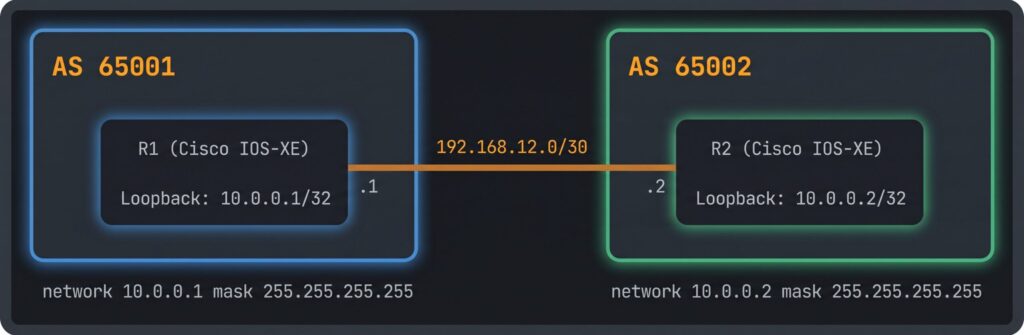
The Lab Topology
For this example, we have two routers. Router-A is in AS 65001 with an interface IP of 192.168.1.1/30. Router-B is in AS 65002 with an interface IP of 192.168.1.2/30. They’re directly connected. That’s it. Simple topology, real concepts.
Router-A wants to advertise the prefix 10.0.1.0/24 to Router-B. Router-B will accept it, filter it through a prefix-list, and do some route-map manipulation. We’ll verify everything at the end.
Minimum Viable BGP Session
On Router-A:
router bgp 65001
 bgp router-id 1.1.1.1
 neighbor 192.168.1.2 remote-as 65002
 !
 address-family ipv4 unicast
  neighbor 192.168.1.2 activate
  network 10.0.1.0 mask 255.255.255.0
 exit-address-family
On Router-B:
router bgp 65002
 bgp router-id 2.2.2.2
 neighbor 192.168.1.1 remote-as 65001
 !
 address-family ipv4 unicast
  neighbor 192.168.1.1 activate
 exit-address-family
That’s it. Those commands are enough to bring up a BGP session and start exchanging routes.
A few things to notice. The bgp router-id command sets the BGP router identifier explicitly. Without this, IOS picks the highest loopback IP or the highest active interface IP. Setting it explicitly means your router-id won’t change when interfaces go up or down. Set it. Every time.
The neighbor command under the main BGP process defines the peer relationship. remote-as tells BGP what AS the neighbor is in. If the AS number you configure doesn’t match what the neighbor sends in its OPEN message, the session won’t come up.
The address-family ipv4 unicast section is where you activate the neighbor for IPv4 routing and add networks to advertise. The neighbor activate command inside the address family is what actually enables the neighbor to send and receive IPv4 prefixes. On some platforms this is implicit. On others it’s required. Get in the habit of including it.
The network Command
The network 10.0.1.0 mask 255.255.255.0 command tells BGP to advertise this prefix, but it only works if the exact prefix already exists in the router’s routing table. If 10.0.1.0/24 isn’t in the IP routing table when BGP tries to install the advertisement, the network command does nothing and you get no error. The route just quietly doesn’t get advertised.
This is one of the more annoying silent failure modes in BGP. You add the network statement, the session is up, but the neighbor isn’t seeing the route. Check the routing table first: show ip route 10.0.1.0. If it’s not there, either the connected/loopback interface is down or you need to add a static route for the prefix and point it to null0 as a route anchor, which looks like this: ip route 10.0.1.0 255.255.255.0 null0
Route Filtering with Prefix-Lists
Running BGP without filtering is a security and stability risk. Before you ever advertise routes or accept them from a peer, you should have prefix-lists in place. They’re clean, fast to process, and unambiguous.
On Router-B, let’s create an inbound prefix-list that only accepts 10.0.1.0/24 from Router-A and rejects everything else:
ip prefix-list ACCEPT-FROM-A seq 5 permit 10.0.1.0/24
ip prefix-list ACCEPT-FROM-A seq 10 deny 0.0.0.0/0 le 32The first entry permits the specific prefix we want. The second entry explicitly denies everything else. Technically there’s an implicit deny at the end of every prefix-list, but being explicit is better documentation and removes any ambiguity about intent.
Apply the prefix-list to the neighbor as an inbound filter:
router bgp 65002
 address-family ipv4 unicast
  neighbor 192.168.1.1 prefix-list ACCEPT-FROM-A in
After applying the prefix-list, clear the BGP session to trigger a routing policy update:
clear bgp ipv4 unicast 192.168.1.1 soft in
Route-Maps for Filtering and Attribute Manipulation
Prefix-lists handle permit and deny decisions cleanly. When you need to do both filtering and attribute manipulation in the same policy, route-maps are the tool.
Here’s a route-map on Router-B that accepts 10.0.1.0/24, sets local preference to 200, and denies everything else:
ip prefix-list ALLOWED-PREFIXES seq 5 permit 10.0.1.0/24

route-map INBOUND-POLICY permit 10
 match ip address prefix-list ALLOWED-PREFIXES
 set local-preference 200

route-map INBOUND-POLICY deny 999
Apply it to the neighbor:
router bgp 65002
 address-family ipv4 unicast
  neighbor 192.168.1.1 route-map INBOUND-POLICY in
The implicit deny at the end of every route-map means BGP drops anything that doesn’t match a permit clause. The explicit deny 999 entry at the end of the route-map makes that behavior visible and intentional. Don’t rely on implicit denies in production configs. Someone reading it later won’t know if you meant it or forgot a permit clause.
Verification Commands
These are the commands you’ll use after every configuration change. Get comfortable with all of them. Commands in this post are IOS-XE syntax
Show the session status:
show bgp summary
show bgp neighbors 192.168.1.1
Look for Established in the BGP state. Look at the Up/Down timer and the prefixes received (PfxRcd). If the session is in Established but PfxRcd is 0, you have a filtering problem or the neighbor is not advertising any networks.
Show the BGP table:
show bgp ipv4 unicast
show bgp ipv4 unicast 10.0.1.0/24
A > next to a prefix means it’s the best path and will be installed in the routing table. An * means it’s a valid path.
Show the routing table:
show ip route bgp
show ip route 10.0.1.0
Just because a route is in the BGP table doesn’t mean it made it into the routing table. If another protocol has a better administrative distance for the same prefix, BGP loses.
Debug for session establishment (use carefully in production):
debug ip bgp 192.168.1.1 events
This shows you the state machine transitions. Useful for figuring out why a session won’t come up. Turn it off when you’re done:
undebug all
The Mistakes Everyone Makes Once
Forgetting to activate the neighbor in the address-family. Session comes up, no prefixes exchange. Check show bgp neighbors x.x.x.x for the line that says whether the neighbor is activated under the address family.
Network statement for a prefix that isn’t in the routing table. No error, no advertisement, total silence. Check show ip route first.
Route-map applied in the wrong direction. Inbound filters inbound prefixes. Outbound filters outbound advertisements. Applying the wrong direction means your policy runs on traffic that never needed it and the traffic you wanted to filter is unaffected.
Forgetting a soft reset after applying a filter. BGP doesn’t automatically re-evaluate existing prefixes when you change a policy. Use clear bgp ipv4 unicast neighbor-ip soft in for inbound policy changes and soft out for outbound. Hard clears (clear bgp ipv4 unicast neighbor-ip) drop and re-establish the session. Use soft resets in production.
Once you’re comfortable with the verification output, the mistakes start making more sense.