Here’s the scenario. You configure iBGP between your edge routers and your internal routers. Sessions come up. You see routes in the BGP table. Everything looks right. And then you ping a destination that should be reachable and it fails.
show bgp ipv4 unicast x.x.x.x/y shows the route. show ip route x.x.x.x shows the route in the routing table. But traffic isn’t getting there. You stare at it for a while. Maybe you re-check the BGP config. Maybe you check the interface status. Everything looks fine.
Then you look at the next-hop on that BGP route and it’s an address that doesn’t exist in your routing table. There it is.
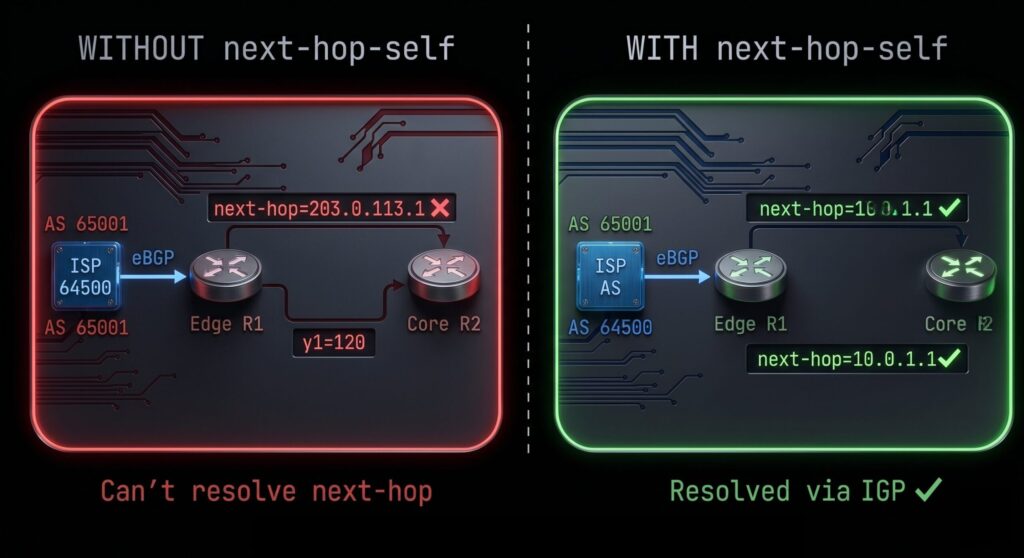
Why Next-Hop Self Exists
When your edge router learns a route from an eBGP peer, the eBGP peer’s IP address becomes the next-hop attribute. That’s correct behavior. Your edge router can reach that IP because it’s directly connected to the ISP’s router.
Now that same edge router advertises the route into iBGP to your internal routers. By default, iBGP does not change the next-hop attribute when it reflects routes internally. The internal routers receive the route with the next-hop still pointing to your ISP’s router address, a 203.x.x.x or 198.x.x.x or whatever public IP your ISP uses on that link.
Your internal routers have no idea how to reach 203.x.x.x. That IP is on a link between your edge router and the ISP. It’s not in your IGP. Nobody’s redistributing it anywhere. Your internal routers see the BGP route, the route looks valid, but when traffic needs to actually go somewhere the router can’t resolve the next-hop. The route is there and unreachable at the same time.
Next-hop self fixes this. When configured, the edge router rewrites the next-hop for all iBGP advertisements to use its own IP address (typically its loopback). Now internal routers receive the BGP route with a next-hop that points to the edge router, which is reachable via the IGP. Traffic flows correctly.
The Configuration
One command per neighbor on the edge router:
router bgp 65001
 address-family ipv4 unicast
  neighbor 10.0.0.2 next-hop-self
  neighbor 10.0.0.3 next-hop-self
  neighbor 10.0.0.4 next-hop-self
Add next-hop-self for every iBGP peer that needs to reach external destinations through this router. That’s typically all of your internal iBGP peers.
After adding this, soft reset the neighbors to trigger a route refresh:
clear bgp ipv4 unicast 10.0.0.2 soft out
Now check show bgp ipv4 unicast x.x.x.x/y from one of your internal routers. The next-hop should now show your edge router’s loopback IP instead of the ISP’s link IP.
What You Should Redistribute Into Your IGP
The alternative to next-hop self is redistributing the ISP’s link addresses into your IGP. If your internal routers have a route to the ISP link subnet, they can resolve the external next-hop directly without next-hop self.
Some people do this. It works. But it introduces external addresses into your internal routing table, which creates noise and can cause security concerns. If your IGP accidentally gets redistributed somewhere it shouldn’t go, those external addresses go with it.
Next-hop self is cleaner. The edge router acts as the gateway and takes responsibility for forwarding to external destinations. Internal routers don’t need to know anything about the ISP link addresses.
The Route Reflector Interaction
Route reflectors introduce a subtle complication with next-hop self.
When a route reflector reflects a route, it doesn’t change the next-hop by default. So even if your edge router has next-hop-self configured toward the RR, the RR will pass that route to its clients with the same next-hop it received. The clients get the edge router’s loopback as the next-hop, which is reachable, so that works.
But here’s where it can break. If you have multiple edge routers and both are advertising to the same RR, the RR might reflect a route from Edge-1 to Edge-2. Edge-2 receives a route with a next-hop pointing to Edge-1’s loopback. That’s fine if Edge-2 can reach Edge-1’s loopback via the IGP. It breaks if there’s an asymmetric topology or missing IGP reachability.
Always verify that your IGP is advertising all loopback addresses that appear as BGP next-hops. show ip route x.x.x.x where x.x.x.x is the next-hop IP. If it’s not in the routing table, that route isn’t usable regardless of what the BGP table says.
The next-hop-self all Option
On IOS-XE, there’s an extended form: neighbor x.x.x.x next-hop-self all. The standard next-hop-self only rewrites the next-hop for eBGP-learned routes being advertised into iBGP. The all keyword also rewrites the next-hop for routes that iBGP is already reflecting.
In most designs you’ll want the standard form. The all option is useful in route reflector designs where you want the RR itself to set the next-hop to its own address for all reflected routes, which can simplify internal routing table requirements. But it can also mask underlying connectivity problems. Use it deliberately, not as a default.
Verification
Check the next-hop on a specific BGP prefix from an internal router’s perspective:
show bgp ipv4 unicast 3.3.3.3/32
R4#show bgp ipv4 unicast 3.3.3.3/32
BGP routing table entry for 3.3.3.3/32, version 3
Paths: (1 available, best #1, table default, RIB-failure(17))
  Advertised to update-groups:
     1          2
  Refresh Epoch 1
  Local, (Received from a RR-client)
    3.3.3.3 (metric 11) from 3.3.3.3 (3.3.3.3)
      Origin IGP, localpref 100, valid, internal, best
      rx pathid: 0, tx pathid: 0x0
Updated on Jul 13 2026 20:49:14 UTCLook at the From: field. It should be an IP address reachable via your IGP, specifically a loopback address on one of your edge or RR routers.
Then verify the next-hop is actually in the routing table:
show ip route 3.3.3.3
R4#show ip route 3.3.3.3
Routing entry for 3.3.3.3/32
  Known via "ospf 1", distance 110, metric 11, type intra area
  Last update from 10.0.34.1 on GigabitEthernet2, 00:12:15 ago
  Routing Descriptor Blocks:
  * 10.0.34.1, from 3.3.3.3, 00:12:15 ago, via GigabitEthernet2
Route metric is 11, traffic share count is 1Where 3.3.3.3 is the BGP next-hop. If this command comes back with no result or a route pointing somewhere unexpected, you’ve found your problem.