Here’s something that surprises people who are new to BGP. The same protocol that’s been routing IPv4 across the internet since 1994 also handles IPv6, MPLS VPNs, EVPN, multicast routing information, and several other things you might not expect. Not through separate protocols. Through address families.
Once you understand address families, BGP stops being “that thing that routes IPv4” and becomes the actual multi-protocol framework that runs modern networks. So let’s get into it.
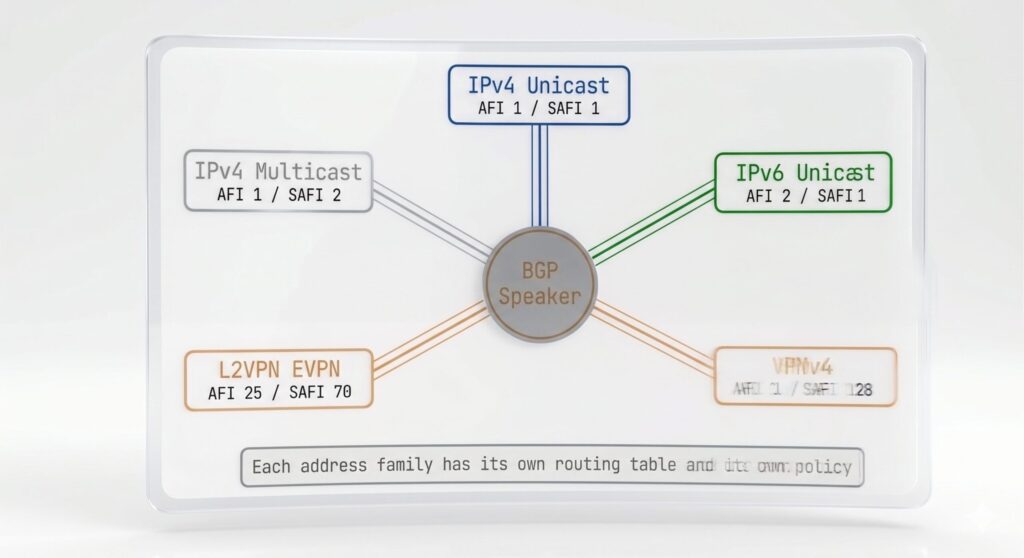
What Address Families Are
BGP started as a protocol that routed IPv4 unicast prefixes. That’s it. One job. And it did it well enough that when the internet needed to route other types of information, the answer was to extend BGP rather than build something new.
RFC 4760 defined the extension mechanism: Multi-protocol BGP, or MP-BGP. It added two new concepts: the Address Family Identifier (AFI) and the Subsequent Address Family Identifier (SAFI).
The AFI identifies the type of address the route uses. IPv4 is AFI 1. IPv6 is AFI 2. L2VPN is AFI 25. There are others.
The SAFI distinguishes different types of routes within the same address family. Unicast is SAFI 1. Multicast is SAFI 2. Labeled unicast (used in MPLS) is SAFI 4. EVPN is SAFI 70.
An address family in BGP is the combination of an AFI and a SAFI. The most common ones you’ll work with:
- IPv4 Unicast (AFI 1, SAFI 1): Standard IPv4 routing. What you’ve been configuring in this series.
- IPv6 Unicast (AFI 2, SAFI 1): IPv6 routing via BGP.
- VPNv4 (AFI 1, SAFI 128): MPLS VPN routing. Used in service provider L3VPN environments.
- VPNv6 (AFI 2, SAFI 128): MPLS VPN routing for IPv6.
- L2VPN EVPN (AFI 25, SAFI 70): Ethernet VPN. The control plane for modern VXLAN data center fabrics and MPLS-based Ethernet services.
BGP can run all of these simultaneously over a single BGP session with a neighbor, using MP-BGP capability negotiation during session establishment.
The Address-Family Configuration Structure
Modern BGP configuration is organized around address families. The main router bgp stanza defines global settings and neighbors. The actual route exchange happens under address-family sections.
Here’s a BGP session that handles both IPv4 and IPv6 unicast:
router bgp 65001
 bgp router-id 1.1.1.1
 neighbor 192.168.1.2 remote-as 65002
 !
 address-family ipv4 unicast
  neighbor 192.168.1.2 activate
  network 10.0.1.0 mask 255.255.255.0
 exit-address-family
 !
 address-family ipv6 unicast
  neighbor 192.168.1.2 activate
  network 2001:db8:1::/48
 exit-address-family
The neighbor is defined once at the global level. The activate command under each address family enables the exchange of that specific address family with that neighbor. If you only activate under IPv4 but not IPv6, BGP won’t exchange IPv6 routes even though the session is up.
IPv6 BGP: The Part Everyone Gets Wrong
IPv6 BGP is where most people trip over themselves at least once, so let’s address the two most common issues directly.
Issue 1: Running IPv6 BGP over an IPv4 session.
It’s actually possible to exchange IPv6 routes over an IPv4 BGP session. The BGP session itself uses IPv4 as the transport, but MP-BGP carries IPv6 NLRI (Network Layer Reachability Information) in the update messages.
This sounds convenient but creates a next-hop problem. If you’re advertising an IPv6 prefix over an IPv4 session, the next-hop for that IPv6 prefix needs to be an IPv6 address, but the BGP session itself only has IPv4 addresses associated with it. Cisco handles this by automatically setting the next-hop to the IPv4-mapped IPv6 address of the BGP peer, something like ::ffff:192.168.1.2. Your neighbor might not know what to do with that.
The cleaner approach is running IPv6 BGP sessions over IPv6 transport. Configure the neighbor using its IPv6 address:
router bgp 65001
 neighbor 2001:db8::2 remote-as 65002
 !
 address-family ipv6 unicast
  neighbor 2001:db8::2 activate
  network 2001:db8:1::/48
 exit-address-family
This gives you a clean IPv6 BGP session with proper IPv6 next-hop behavior.
Issue 2: Forgetting that IPv4 and IPv6 are separate routing tables.
BGP maintains separate RIBs (Routing Information Bases) per address family. An IPv4 prefix lives in the IPv4 unicast table. An IPv6 prefix lives in the IPv6 unicast table. Policies applied to one address family don’t automatically apply to the other.
This means your route-maps, prefix-lists, and neighbor policies need to be applied per address family. If you apply a filter under address-family ipv4 unicast it has zero effect on IPv6 routes, even for the same neighbor.
Checking Address Family Capabilities
When two BGP routers establish a session, they exchange their supported capabilities in the OPEN message, including which address families they support. You can see what was negotiated:
R1#show bgp ipv4 unicast neighbors 172.16.12.2 | inc Address[- ][Ff]amily
    Address family IPv4 Unicast: advertised and received

R1#show bgp ipv6 unicast neighbors 2001:DB8:12::2 | inc Address[- ][Ff]amily
Address family IPv6 Unicast: advertised and receivedOr the more detailed view:
show bgp neighbors x.x.x.x
Look for the Address family IPv4 Unicast: and Address family IPv6 Unicast: sections. You’ll see whether the address family is advertised, received, and whether it’s active (meaning both sides agreed to exchange routes under that family).
Viewing Separate Tables
Because BGP maintains separate tables per address family, your show commands need to specify which table you’re looking at:
R1#show bgp ipv4 unicast
BGP table version is 5, local router ID is 1.1.1.1
Status codes: s suppressed, d damped, h history, * valid, > best, i - internal,
              r RIB-failure, S Stale, m multipath, b backup-path, f RT-Filter,
              x best-external, a additional-path, c RIB-compressed,
              t secondary path, L long-lived-stale,
Origin codes: i - IGP, e - EGP, ? - incomplete
RPKI validation codes: V valid, I invalid, N Not found

     Network          Next Hop            Metric LocPrf Weight Path
 *>   1.1.1.1/32       0.0.0.0                  0         32768 i
 *>   2.2.2.2/32       172.16.12.2              0             0 2 i
 *>   10.1.0.0/24      0.0.0.0                  0         32768 i
 *>   10.2.0.0/24      172.16.12.2              0             0 2 i
R1#show bgp ipv6 unicast
BGP table version is 4, local router ID is 1.1.1.1
Status codes: s suppressed, d damped, h history, * valid, > best, i - internal,
r RIB-failure, S Stale, m multipath, b backup-path, f RT-Filter,
x best-external, a additional-path, c RIB-compressed,
t secondary path, L long-lived-stale,
Origin codes: i - IGP, e - EGP, ? - incomplete
RPKI validation codes: V valid, I invalid, N Not found
Network Next Hop Metric LocPrf Weight Path
*> 2001:DB8::1/128 :: 0 32768 i
*> 2001:DB8:1::/48 :: 0 32768 i
*> 2001:DB8:2::/48 2001:DB8:12::2 0 0 2 iR1#show bgp ipv4 unicast 2.2.2.2/32
BGP routing table entry for 2.2.2.2/32, version 4
Paths: (1 available, best #1, table default)
Not advertised to any peer
Refresh Epoch 1
2
172.16.12.2 from 172.16.12.2 (2.2.2.2)
Origin IGP, metric 0, localpref 100, valid, external, best
rx pathid: 0, tx pathid: 0x0
Updated on Jul 14 2026 03:05:13 UTCR1#show bgp ipv6 unicast 2001:db8::2/128
BGP routing table entry for 2001:DB8::2/128, version 5
Paths: (1 available, best #1, table default)
Not advertised to any peer
Refresh Epoch 1
2
2001:DB8:12::2 (FE80::E00:7DFF:FEF5:9101) from 2001:DB8:12::2 (2.2.2.2)
Origin IGP, metric 0, localpref 100, valid, external, best
rx pathid: 0, tx pathid: 0x0
Updated on Jul 14 2026 03:11:23 UTCThe show bgp all summary command will show you all your BGP neighbors across all address families in a single view.
R1#show bgp all summary
...

Neighbor        V           AS MsgRcvd MsgSent   TblVer  InQ OutQ Up/Down  State/PfxRcd
172.16.12.2     4            2      10      10        5    0    0 00:06:10        2

For address family: IPv6 Unicast
...

Neighbor        V           AS MsgRcvd MsgSent   TblVer  InQ OutQ Up/Down  State/PfxRcd
2001:DB8:12::2 4 2 11 11 5 0 0 00:06:24 2Why This Matters for Modern Networking
If you’re working with any of the following, address families are already part of your day:
VXLAN/EVPN data center fabrics. The L2VPN EVPN address family carries MAC address and IP binding information, gateway advertisements, and multicast group membership. EVPN is BGP. If you’ve been told to “set up the BGP underlay and EVPN overlay” for a data center project, you’re about to be configuring multiple address families.
MPLS L3VPN. Service providers running MPLS VPNs use the VPNv4 or VPNv6 address families. PE routers import customer routes into VRFs and export them via VPNv4 NLRI to other PE routers.
IPv6 adoption. As IPv6 becomes increasingly non-optional, adding IPv6 unicast as a BGP address family alongside IPv4 is straightforward. The hard part is usually making sure your prefix filters, route policies, and next-hop configurations are correct for IPv6 specifically.
Each of these topics is a series of its own. But this is the foundation. BGP is a multiprotocol routing protocol. Address families are how it carries routing information for different protocol types over a single session. That concept carries through everything else you’ll build on top of it.